
The new Android 17 QPR3 Beta 2 update adds a new security feature to the lock screen that forces you to unlock your phone before you can adjust connectivity. It’s called “Lock Quick Settings connectivity” and we think everyone should enable it.
The update that dropped today on Pixel phones in the Android Beta Program is light on new features, but this is one we can already see coming in handy if you were to lose your phone.
The idea behind this new setting is pretty simple. By toggling this on, your phone then requires you to unlock your device in order to adjust connectivity settings. Things like Wi-Fi, Bluetooth, Airplane mode, and mobile data cannot be toggled on or off through Quick Settings unless the device is unlocked.
If someone were to steal your phone, these are the types of settings they will likely immediately target to try and take your phone offline as they get away with it. If they aren’t allowed to change these settings without unlocking, that should give you more time to take steps to either wipe your phone, find it, or get anything else off of it that you can.
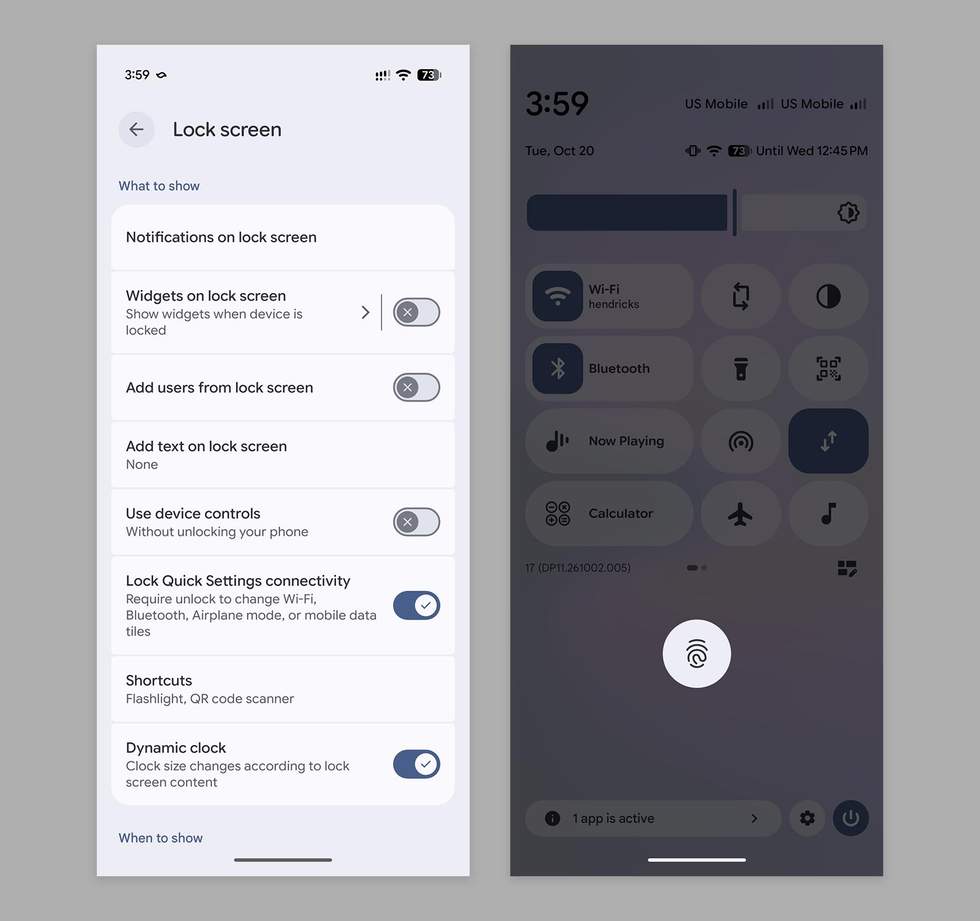
To find this new setting in Android 17 QPR3 Beta 2, you’ll perform the following:
Once enabled, your phone will ask for your PIN, password, pattern, or fingerprint/face before you can change the status of these settings.
If you aren’t in the Android Beta Program, but would like this feature today, you can join at this site.
Read the original post: New Android 17 Update Adds Security Setting I Didn’t Realize I Needed So Badly


